
Build Your Own Smart-Search MCP: The Full Playbook
The complete step-by-step guide to building the smart people and company search MCP we run in production on Parallel and Exa. Written for non-technical builders: seven phases, copy-paste prompts, and click-by-click platform setup.

Deep Singh
Principal Talent Engineer & Co-Founder, Effi Flo
By Deep Singh, Principal Talent Engineer and Co-Founder, Effi Flo
In short: Type a brief in plain English, get named people or companies back, verified when the query is hard, instant when it is easy. We built that as an MCP server on top of Parallel and Exa, routed by the numbers from our 884-result accuracy study, and we run it in production. This is the complete playbook to build your own: seven phases, every prompt included, no code experience needed.
Key Takeaways
- The raw search products will quietly burn you. Fast search is 88 to 100% accurate on simple queries, then falls to 0 to 8% at three stacked requirements. Your MCP bakes that knowledge into the plumbing so no agent ever picks the wrong engine.
- One tool, automatic routing. The server reads each query, measures its difficulty, and routes it: instant fast search for simple asks, verified search for hard ones. The rules come from evidence, not vibes.
- You never write code. Claude Code builds everything from eight copy-paste prompts. Your job is accounts, prompts, and reading the results.
- Real numbers from ours: about $0.005 per fast search, about $1.53 per verified 25-name list, free hosting, and the whole study behind the routing cost about $75.
Two ways to do this
The short way: let Claude build it with you. Everything below ships as an installable guided build. Claude asks what accounts you already have, then works through the seven phases with you, stopping at each checkpoint until it actually works. In Claude Code:
/plugin marketplace add EffiFlo/build-your-own-search-mcp
/plugin install build-search-mcp@effiflo
/build-search-mcp
The long way: read this page. Same seven phases, same eight prompts, nothing held back. Use it if you want the reasoning before you commit three hours, or as the reference when something puzzles you mid-build.
We would start with the guided version. Not because this page is abridged, but because a written guide cannot adapt and a live one can. Vendor dashboards get redesigned, endpoints move, and hosts get renamed underneath you. When that happens the guided build reads the actual error and works around it. A page just keeps confidently telling you to click something that is no longer there.
Repository: github.com/EffiFlo/build-your-own-search-mcp
Part A - The Context
Why build your own search MCP instead of buying one?
A new class of AI search products lets you type "CTOs at Series C fintechs in NYC" and get back real named people or companies. Two platforms lead the space: Parallel and Exa. Both offer their own connectors, so why build your own MCP on top of them?
Because the raw products, used directly, will quietly burn you. Our published study (884 results, every one independently graded) found:
- Fast search is 88-100% accurate on simple queries, then falls off a cliff at 3 stacked requirements (down to 0-8% on people queries)
- Asking fast search about a person's EMPLOYER (funding stage, size) is only 4% accurate, basically random
- Verified search (Exa Websets) holds 88-100% through 4 requirements, but takes minutes and costs about 6 cents per verified name
- Nobody publishes these numbers. If you use the vendors' own connectors, YOU have to remember which tool to trust for which query, and so does every AI agent you run
Your MCP bakes that knowledge into the plumbing. One tool, fs_search: it reads the query, measures its difficulty, and routes it to the right engine automatically. The routing rules come from evidence, not vibes, and no user or agent ever needs to know they exist.
How it beats using the vendor connectors directly
| Direct vendor connectors | Your own MCP |
|---|---|
| You pick the engine per query (and agents pick wrong) | Server routes by measured accuracy: agents cannot hit the 4% trap |
| No memory: same search billed twice | 7-day cache: repeat searches are free and identical |
| No record of who searched what, at what cost | Every search logged with caller and cost in your own database |
| Anyone with the vendor key has full access | Your own tokens: revoke any user in seconds |
| Results vanish into the chat | Results persist as data you can re-query, report on, and audit |
Is it cheaper to build your own than to buy a sourcing tool?
Yes, and it is not close. But cost is the weaker half of the argument, so take the numbers first and then the part that actually matters.
What running this costs us. A fast search is about $0.005. A verified 25-name list is about $1.53. Hosting is free on Render's starter tier. The query-reading step is about a tenth of a cent. A recruiter running fifty searches a day is spending well under a dollar, and repeat searches inside the cache window cost nothing at all. The only real subscription is Exa's Websets plan at $49 a month, and only once you need verified lists at volume.
What building it costs. Three to four hours of your time, and effectively nothing in money. You are not paying for development because you are not doing any: Claude Code writes and runs every line from eight prompts in this playbook.
Now the part that matters. Bought sourcing tools price per seat, which means your cost scales with headcount rather than with usage. More importantly, they do not show you which engine answered your query or what that answer cost. You get a list. You do not get the reasoning, the confidence, or the bill.
When you own the server you own five things a vendor will not hand over: the routing rules, so a hard query cannot silently be answered by the engine that is 4% accurate on it; the cache, so the same search is never billed twice; the cost log, so you can answer "what did sourcing cost us last month" with one database query; the access tokens, so revoking a leaver takes seconds and no redeploy; and the results themselves, as data you can re-query rather than text that scrolls out of a chat window.
When you should not build this. If you need to fill a role from a job description at volume, this is the wrong tool and buying is the right call. This is a precision instrument, roughly a hundred results per search. Sourcing hundreds of profiles at pennies each, scoring them, deduplicating them and running outreach is a different system. Build this when you want a small number of correct answers to hard questions, not a large number of approximate ones.
What can you actually do with a smart-search MCP?
- Instant market texture: "who is even out there?" in 4 seconds for half a cent
- Verified target lists: 25 names checked against every requirement, about $1.50 a list
- Multi-hop research: "find the companies AND their decision-makers" in one call
- A cost-per-search, cost-per-user report from a single database query
What a result actually looks like
Before you invest three hours: here is the shape of what comes back. A fast search for "recruiters at boutique staffing agencies in Toronto" returns in about 4 seconds:
route: fast (2 stacked requirements, no red flags)   cost: $0.005

1. Sarah Whitfield - linkedin.com/in/sarah-whitfield-example
   Senior Technical Recruiter | Northbound Talent
   Boutique agency, Toronto | 8 yrs full-cycle tech recruiting
2. Marcus Oyelaran - linkedin.com/in/marcus-oyelaran-example
   Principal Recruiter | Finch & Grey Search | Toronto
   Fintech + engineering desks
3. Priya Raghunathan - linkedin.com/in/priya-r-example
   Managing Consultant | Elmwood Staffing Partners | GTA
   Perm placements, sales + CS
... (22 more)
A verified search additionally returns a per-requirement tick sheet for every name ("boutique agency: yes, with evidence", "Toronto: yes, with evidence"). Names above are illustrative samples, not real people.
And here is a real session summary from ours: six searches in one sitting, the routes the server picked, and what each cost. Four instant fast-lane searches at half a cent each, two verified lists, $0.57 total for 43 entities.
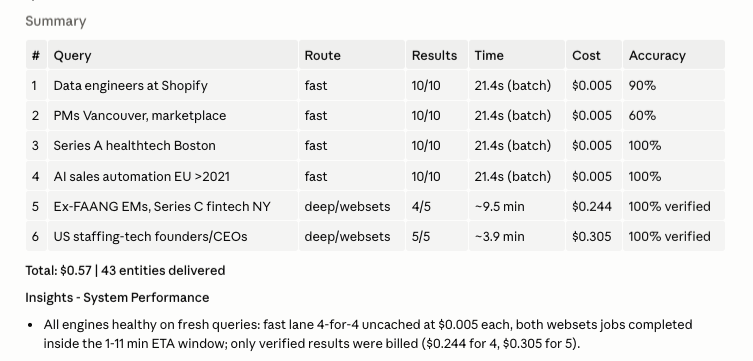 A real session summary: six queries with their route, results, time, cost and accuracy. Four fast-lane searches at $0.005 each with 60-100% accuracy, two verified websets runs at $0.24-0.31 with 100% verified accuracy. Total $0.57 for 43 entities delivered
What a smart-search MCP will not solve
It is not a recruiting pipeline. Filling an open role from a JD needs sourcing at volume, comp and seniority gates, dedup, scoring, and outreach: hundreds of profiles at pennies each. This MCP is a precision tool (about 100 results max per search). 5+ stacked requirements will not be highly accurate on ANY engine: our best measured score at 5 stacked requirements was 60-100% depending on query type. And pedigree claims (schools, past employers) always need a human skim: the weakest verification class on every engine we tested.
Part B - The Concepts, in Plain English
What is an MCP?
A Model Context Protocol server: a small web service that gives AI agents new tools. Claude connects to it and suddenly knows how to "search for people." You are not building an app with screens. You are building capabilities for agents.
How does the server decide which engine to use?
The difficulty measure is stacked requirements: how many separate things must ALL be true of each result. "ML engineers at Stripe" = 2. "Series A fintechs in NYC hiring ML engineers" = 4. In the code this count is called depth, same thing.
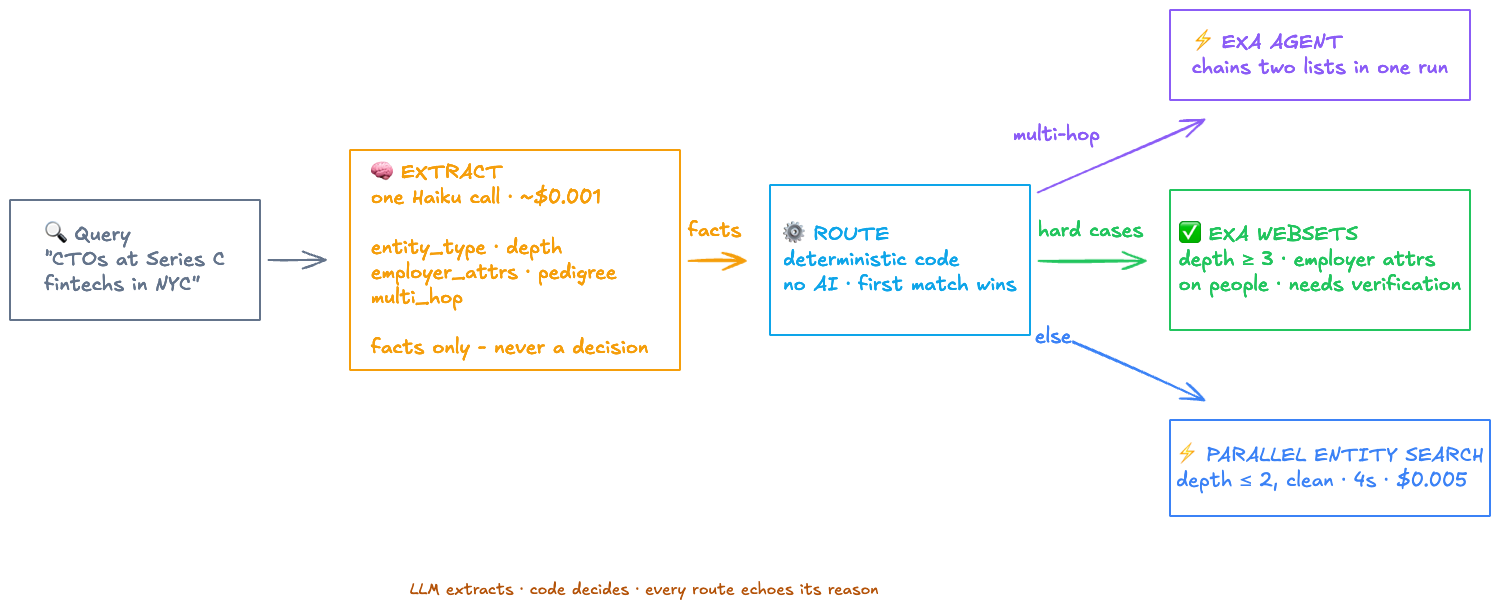 The routing workflow: a query goes through EXTRACT (one Haiku call pulls facts only) then ROUTE (deterministic code, first match wins) to one of three engines: Exa Agent for multi-hop, Exa Websets for hard cases needing verification, Parallel Entity Search for clean depth-2-or-less queries
Step 1, EXTRACT (one tiny LLM call, about $0.001). It pulls out facts only: people or companies? How many stacked requirements? Does it ask about the employer's funding or size? Does it name schools or past employers (pedigree)? Is it a two-step ask (multi-hop)?
Step 2, ROUTE (plain code, no AI). First match wins:
| # | Condition | Engine |
|---|---|---|
| 1 | Multi-hop ask | Exa Agent |
| 2 | 3 or more stacked requirements | Exa Websets |
| 3 | Employer attributes on a people query | Exa Websets |
| 4 | Verify-signals regex hit: "Series A" to "Series E", seed, raised, funding, valuation, unicorn, hiring, founded after, "last N years", headcount | Exa Websets |
| 5 | Everything else | Parallel (fast) |
The design principle: the LLM extracts facts, it never makes the decision. The decision is five lines of ordinary code, each line backed by a measured number from the study. A deterministic "verify-signals" check (step 4) backstops the LLM: even if it miscounts the requirements, words like "Series A" or "hiring right now" force the verified route. Every response echoes what was extracted and why the route was chosen, so you can always audit the decision.
Fast routes answer instantly. Verified routes return a job ticket (searches take 1-10 minutes) and you collect the result with a second tool call when it is ready.
What is caching, and how does it work here?
Caching = remembering answers so you never pay for the same question twice.
How ours works: when a search comes in, the server sorts the request parameters and computes a fingerprint (a sha256 hash: the same request always produces the same fingerprint). Before calling the provider, it checks the results table: is there a row with this fingerprint, marked ok, newer than 7 days? If yes, return it. Free, instant, and IDENTICAL to last time, which matters when a client asks "why is this list different from yesterday?"
One nuance: the fingerprint covers ALL the request parameters, so the same query with a different result count (25 vs 50) is a different fingerprint, and a fresh, billed search. That is intentional: a bigger list is a different answer.
How to enable it: you do not install anything. The cache IS your results table plus that fingerprint lookup, about 15 lines of code. The build prompt includes it. Callers can bypass it with a force_refresh flag when they explicitly want fresh results.
What does the database store?
Design rule: store the raw response as JSON first, plus the few columns you will report on. One row per event. Comment every table and column so the database explains itself.
| Table | What it holds | Secret double life |
|---|---|---|
searches | One row per search: the request, who asked (caller), duration, cost, and the FULL result as JSON | It is also the cache (fingerprint lookup) AND the billing report (SUM(cost) GROUP BY caller) |
search_jobs | Order tickets for slow verified searches: status running to done, which engine, why routed there, final payload | Lets tools return instantly instead of blocking for 10 minutes |
access_tokens | Access tokens, stored as hashes (never plaintext), with expiry and an active flag | Revoking a user = flipping one field. No redeploy. |
One safety note: your server uses the Supabase service_role key, which bypasses ALL of Supabase's row-level security. That is fine here, but it means this Supabase project should hold ONLY your MCP's tables. If you ever build a customer-facing app, give it its own separate Supabase project.
What do FastAPI and FastMCP actually do?
- FastAPI: the standard Python library for building web services. It gives your MCP normal web addresses (like
/searchand/health) that scripts and browsers can call. - FastMCP: the library that speaks the MCP protocol to AI agents.
- The trick in our build: one service, two faces. The same core function sits behind both. Agents call it as an MCP tool, scripts call it as a URL. Logic exists once.
Why Python, and how scripts fit in
Python is the language AI tooling speaks best: every provider ships Python examples, and Claude Code writes it fluently. You will not hand-write code; Claude does. Your job is to give good prompts and test the results.
Python scripts (small standalone files you run once) are how we probe APIs, test the build, and run accuracy checks. Advantages: fast to write, easy to read, disposable. Disadvantages: they run on YOUR machine and stop when you close the laptop, which is exactly why the real service lives on Render, not in a script.
What are GitHub, Render and API keys for?
GitHub is version control: every change to your code is saved with history, and it is the bridge to deployment (Render watches your repository and redeploys on every push). Claude Code handles all the git commands; you never type them.
Render is a cloud that runs your service 24/7 from your GitHub repo. Free tier is fine to start (one caveat: free services sleep when idle, so the first call after a quiet period takes about 30 seconds).
API keys are the passports: every provider gives you a secret key that proves requests are yours (and bills you). You will fetch them from each dashboard: Parallel (platform.parallel.ai), Exa (dashboard.exa.ai), Supabase (Project Settings, then API), Anthropic (console.anthropic.com, interchangeable with an OpenRouter key). Rules: keys live in credential files and Render environment variables, NEVER inside code, and never in chat messages.
Part C - The Build, in Seven Phases
How the prompts work: you paste each prompt into Claude Code and press Enter. Claude writes the code, runs it, and shows you the result. You never write or run code yourself. Paste them one at a time at the matching phase, and read what Claude produces before saying yes to anything. See an error instead of the expected result at any point? Paste it back to Claude: it will diagnose and fix it.
Phase 1: Which accounts and API keys do you need?
Phase
Set up accounts
30 min, all free tiers- Install Claude Code and open it in a new project folder (walkthrough below).
- Supabase: create account plus one project; copy Project URL and service role key.
- GitHub: create account plus one private repository.
- Render: create account (setup comes later).
- Providers: create Parallel, Exa, and Anthropic accounts; copy each API key.
- Tell Claude Code to store all keys in a credentials file, never in code.
P-1 · Project kickoff + credential storage
You are helping me build an MCP server for smart people/company search. First, set up
credential storage: create a file called .env in this folder and add my keys as I
paste them (PARALLEL_API_KEY, EXA_API_KEY, ANTHROPIC_API_KEY, SUPABASE_URL,
SUPABASE_SERVICE_ROLE_KEY). Then create a .gitignore that excludes .env and any
credentials from ever reaching git. Confirm the rules: keys live only in .env, never
in code, never printed in full in our chat.
✓ Done when: every row of the final checklist (end of the platform walkthroughs below) is checked and your keys sit in a .env file that .gitignore excludes.
Phase 2: How do you test the APIs before building?
Phase
Test the API before you build
15 min, ~$0.02Ask Claude Code to make 2-3 tiny REAL calls to each provider and print the FULL response: fields, costs, and error behavior. Docs lie; responses do not. Everything learned here goes into the build prompt.
P-2 · Ground-truth probe
Before we build anything, probe the real APIs. Write and run one small Python script
that makes a tiny live call to each provider and prints the COMPLETE raw response:
1) Parallel entity search: look up the current Entity Search endpoint in Parallel's
   docs (docs.parallel.ai) - resolve the exact URL from the docs, do not guess it.
   Call it with entity_type "people", objective "Machine learning engineers at
   Stripe", match_limit 5.
2) Exa Websets: create a webset with 5 results and 2 criteria, poll until idle,
   fetch the items. Use https://api.exa.ai/websets/v0/websets - Exa's API
   reference documents /v0/websets, which 404s and answers in HTML rather
   than JSON. The /websets product prefix is required.
Report back: exactly what fields each returns, what each call cost, how long each
took, and what happens on an invalid request. Do not summarize away any fields - I
want to see the full response shape once.
✓ Done when: you have seen one full raw response from each provider, with real fields and real timing. Neither provider returns cost, credits or usage anywhere in the response, so read that number from the two dashboards (platform.parallel.ai usage, dashboard.exa.ai credits) and use it to build your own price table.
Phase 3: How do you build the MCP server?
Phase
Build the MCP
1-2 hrsGive Claude Code the build prompt: two faces (FastAPI + FastMCP), the three tables, the fingerprint cache, token auth, costs in every response, comments on every table and column. Then the router prompt: the extract-then-route workflow with the thresholds from the study and the verify-signals backstop. Then ask for a test file and run it. Finally, issue yourself a token with python issue_token.py issue my-first-token and save the printed token in your notes: you need it in Phases 5 and 6, and it is shown only once.
P-3 · House-pattern build
Build the MCP server now. Requirements:
- One Python service with two faces: FastAPI routes (GET /search, GET /health) and
  FastMCP tools mounted at /mcp - both calling the same core functions.
- Tools: fs_people(objective, match_limit) and fs_companies(objective, match_limit)
  calling Parallel entity search, returning the full entity list plus result_count
  and cost_estimate in every response.
- Supabase persistence: create table searches (id, created_at, source, caller,
  query_params jsonb, query_hash, entity_type, objective, status, error, duration_ms,
  result_count, cost_estimate, payload jsonb). Every search writes one row. Add
  COMMENT ON for the table and every column.
- Cache: before calling the provider, sha256-hash the sorted request params and look
  for an ok row with the same hash newer than 7 days - if found, return it with
  cached: true and cost 0. Add a force_refresh parameter that bypasses this.
- Auth: create table access_tokens (token_hash, client, service, label, active, expires_at,
  last_used_at). Every request must send Authorization: Bearer <token>; check its
  sha256 against active unexpired rows, cache the check in memory for 60 seconds.
  Also write issue_token.py with three commands: issue <label> (generates a token,
  stores ONLY its hash, prints the raw token exactly once), revoke <label> (sets
  active=false), and list. The raw token must never be stored anywhere.
- Cost guard: before any provider call, sum today's cost_estimate for this caller
  from searches; if it exceeds a DAILY_COST_CAP env var (default 10 dollars),
  reject the search with a clear message naming the cap. This protects against a
  runaway agent looping searches.
- Pin every dependency to an exact version in requirements.txt.
- Keys load from .env. Writes to the results table fail soft (log a warning, never
  crash a search). Also write test_local.py: one real search -> row lands in
  Supabase -> identical repeat returns cached -> bad token rejected. Run it.
P-4 · Smart router
Add a smart router tool called fs_search(query, count, caller):
1) DECODE: one call to a small cheap LLM (Haiku) that extracts ONLY facts from the
   query: entity_type (people/companies), criteria as a list (depth = count),
   employer_attrs_on_people (query asks about a person's employer's funding/stage/
   size), pedigree (schools or named past employers), multi_hop (explicit two-step
   ask like "find companies X and their CTOs"). If the decode fails, raise an error -
   never guess.
2) ROUTE in plain code, first match wins:
   multi_hop -> Exa Agent run; depth >= 3 -> Exa Websets; employer attrs on a people
   query -> Exa Websets; a regex finding verification signals in the raw query
   ("series a-e", seed, raised, funding, valuation, unicorn, hiring, founded after,
   "last N years", headcount) -> Exa Websets; otherwise -> fast Parallel search.
3) Deep routes return immediately with a job_id (store jobs in a search_jobs table:
   job_id, engine, engine_ref, status, criteria, caller, payload) and an fs_result
   (job_id) tool collects them: running / done with entities / failed. Completed
   results also write to searches.
4) Every response echoes criteria_detected, depth, route, and route_reason so the
   decision is auditable. Add explicit override tools fs_deep and fs_agent that take
   a hand-written criteria list. Update test_local.py to cover one fast route and
   one deep route end to end, and run it.
✓ Done when: the test file reports all checks passing, you can see the search row in Supabase (Table Editor, searches), and you are holding one access token.
Phase 4: How do you push the code to GitHub safely?
Phase
Push to GitHub
10 minAsk Claude Code to scan for leaked keys (zero tolerance), then commit and push.
P-5 · Safe commit + push
Scan every file we are about to commit for anything that looks like a secret (key
prefixes, long tokens, JWT strings). If clean, initialize git if needed, commit
everything with a clear message, and push to my GitHub repository <paste repo URL>.
Confirm .env was NOT included.
✓ Done when: your code is visible in the GitHub repository and .env is NOT in it.
Phase 5: How do you deploy the server on Render?
Phase
Deploy on Render
15 min, all clicks- New, then Web Service, then pick your repo.
- Set Root Directory to your MCP folder (forgetting this is failure #1).
- Build:
pip install -r requirements.txt. Start:uvicorn main:app --host 0.0.0.0 --port $PORT. Health check:/health. - Add ALL environment variables before creating the service: provider keys, Supabase URL and service key, LLM key,
DAILY_COST_CAP, andALLOWED_HOSTS. Render shows your service's future URL (yourname.onrender.com) on this same creation screen: use that domain as theALLOWED_HOSTSvalue. Skipping ALLOWED_HOSTS is failure #2: the service deploys fine but every MCP call is rejected. - Create the service and watch the first deploy go green.
✓ Done when: opening https://your-url/health in a browser shows ok, with every credential reporting present.
Phase 6: How do you install the MCP in Claude Code?
Phase
Install in Claude and go live
10 minRegister the MCP in Claude Code, then run the smoke suite: health ok, no token gets 401, a real search routes correctly, repeat is cached, tools visible in Claude Code. Then ask Claude to search for something and watch the route, the results, and the cost come back. You are live.
P-6 · Deployed smoke test
My service is live at https://<my-service-url>. Run the full smoke suite and show me
each result:
1) GET /health returns ok
2) /search WITHOUT a token returns 401, and with a WRONG token returns 401
3) A real fast search with my token returns entities and a cost_estimate
4) The identical search again returns cached: true with cost 0
5) The MCP endpoint lists all tools (initialize + tools/list)
6) One fs_search that should route deep (try "Series A fintech startups in New York")
   returns a job_id, and fs_result eventually returns verified entities
7) Register it in Claude Code: claude mcp add --transport http <name>
   https://<my-service-url>/mcp/ --header "Authorization: Bearer <token>"
Then tell me plainly: what passed, what failed, and what to fix.
✓ Done when: every smoke-test line passes and a search you asked for in plain English comes back with a route, results, and a cost.
Staying healthy from here: Render emails you if a deploy fails; the deploy Logs tab shows runtime errors; and https://your-url/health is your one-glance "is it up" check. Free-tier reminder: an idle service naps, so the first call after a quiet spell takes about 30 seconds. That is normal, not broken.
Phase 7: How do you prove it beats the raw vendors?
Phase
Prove it
skippable, but this is the whole pointThis phase is where you prove your MCP beats using the vendors raw. The routing rules you just built came from OUR study. Phase 7 is how you verify them against YOUR queries, on YOUR market. Skip it and you are back to trusting vendor claims.
Measure your accuracy the way the study did: grade real results against the promise before you trust any engine on hard queries. Then create a Skill so every future session uses your MCP well, and write the one-paragraph note to your team: which tool, what it costs, what to double-check.
P-7 · Accuracy eval
Help me measure how accurate my search engines actually are. Build an eval:
1) Write 10 test queries as a ladder: 5 for companies and 5 for people, starting
   with 1 requirement and adding one more each step up to 5.
2) Run each query through each engine, 25 results per query.
3) Grade EVERY returned result with an independent LLM judge against EVERY
   requirement: satisfied / violated / no evidence (strict: no evidence counts
   against), plus an overall "would a recruiter keep this?" verdict.
4) Report a table: usable% per engine per depth, speed, and cost - and tell me
   where each engine stops being trustworthy. Persist all grades to a table so we
   can re-run this after any provider change and compare.
First install the Skill Creator plugin (one time): in Claude Code type /plugin, open the marketplace, find skill-creator (by Anthropic), and install it. Restart Claude Code. Then:
P-8 · Build the skill with Skill Creator
/skill-creator

I want a skill that teaches every future Claude session to use my search MCP well.
It should trigger whenever I ask for a quick list of people or companies ("find
companies that...", "get me a list of people who..."). The skill must teach:
- call fs_search first and pass my query verbatim; trust the route it picks
- read criteria_detected and route_reason back to me so I can audit the routing
- for deep routes: tell me the eta, then poll fs_result at most once per minute
- present results with verification ticks where available, always show cost, and
  relay every warning verbatim
- never force_refresh unless I ask; beyond ~100 results, tell me to use a proper
  sourcing pipeline instead
Test the skill by running one real search through it, then save it.
What "saving a skill" means: Skill Creator writes a SKILL.md file into your skills folder. From then on it loads automatically in every session whose request matches the skill's description; you never invoke it manually.
✓ Done when: you can answer, with your own numbers, "at how many stacked requirements does fast search stop being trustworthy for MY queries?"
Part D - Platform Setup, Click by Click
Follow these in order. Each section ends with exactly what you should be holding. Button names drift as vendors redesign; what you are looking for does not.
Claude Code (your AI builder)
Claude Code is an AI that operates your computer through a chat window in the terminal. The terminal is just a text window for giving your computer commands: you will mostly watch Claude type into it, not type yourself.
- Open the terminal: Mac, press Cmd+Space, type "Terminal", hit Enter. Windows: Start menu, type "PowerShell", hit Enter.
- Install: paste
npm install -g @anthropic-ai/claude-codeand press Enter. (If it complains npm is missing, install Node.js first from nodejs.org: big green button, default options.) - Make your project folder:
mkdir my-search-mcpthencd my-search-mcp. - Launch: type
claude. A browser window opens: sign in with your Anthropic account (create one if asked; a Claude Pro or Max subscription covers usage). - Say hello. If Claude answers, you are in.
You now have: a working Claude Code inside an empty project folder.
Supabase (your database)
A database project is a private spreadsheet-on-steroids in the cloud. Yours will hold every search, result, cost, and access token.
- Go to supabase.com, Start your project, sign in with GitHub (do the GitHub step first if you have no account yet, then come back).
- New project: pick any name ("search-mcp"), let it generate the database password (you will not need it day-to-day), choose the region closest to you, Create. Wait about 2 minutes while it provisions.
- Left sidebar, Project Settings (gear icon), API.
- Copy two things into a temporary note: the Project URL and the key labeled service_role (long text starting
eyJ...). There are two keys here:anonis the safe public one,service_roleis the master key. Your MCP server needs the master key, and it must never leave your server config. Because the master key bypasses all of Supabase's row-level security, keep this project for your MCP's tables ONLY: a customer-facing app gets its own project.
You now have: 1 Project URL + 1 service_role key.
GitHub (where code lives)
- github.com, Sign up, verify the email.
- Top-right + icon, New repository.
- Name it (
my-search-mcp), select Private, leave every checkbox unticked (Claude will push the first files later), Create repository. - Copy the repository URL from the address bar.
You now have: a GitHub account + 1 empty private repository URL.
Render (where your MCP runs 24/7)
- render.com, Get Started, sign up with GitHub (one click, and it pre-wires the repo access you will need in Phase 5).
- Authorize Render when GitHub asks.
- Stop here: you will come back in Phase 5 to create the actual service.
You now have: a Render account connected to your GitHub.
Parallel (the fast search engine)
An API key is a passport plus a meter: it proves requests are yours and bills your account. Treat every key like a bank card number.
- platform.parallel.ai, sign up, verify email.
- Add a payment method and a small credit amount ($5 is plenty to start: fast searches cost half a cent each).
- Find API Keys in the dashboard, create and copy your key.
You now have: 1 Parallel API key.
Exa (the verified search engine)
The number that matters: a verified name costs about 6 cents. A full 25-name verified list is about $1.53.
- dashboard.exa.ai, sign up: you get free starter credits, enough for testing.
- For real verified-list volume, subscribe to Websets Starter ($49/month = 8,000 credits = roughly 800 verified names at about 6 cents each, about 32 full 25-name lists).
- Dashboard, API Keys, copy your key.
You now have: 1 Exa API key.
Anthropic (the query-reading brain)
This powers the tiny step where your MCP reads each query and extracts the facts for routing: about a tenth of a cent per search.
- console.anthropic.com, sign up (this is the developer console: separate billing from your Claude chat subscription).
- Billing, buy the minimum credits ($5 lasts months at this usage).
- API Keys, Create Key, copy it.
- Alternative: an OpenRouter key works in its place. Env var names, exactly:
ANTHROPIC_API_KEYorOPENROUTER_API_KEY(set whichever key you have; the build accepts both).
You now have: 1 Anthropic (or OpenRouter) API key.
The final checklist
| You should be holding | From | Gets used in |
|---|---|---|
| Claude Code, signed in, in a project folder | Claude Code setup | everything |
| Supabase Project URL + service_role key | Supabase setup | Phase 3 build + Phase 5 env vars |
| GitHub account + empty private repo | GitHub setup | Phase 4 push |
| Render account (GitHub-connected) | Render setup | Phase 5 deploy |
| Parallel API key | Parallel setup | Phase 2 probe + Phase 5 env vars |
| Exa API key | Exa setup | Phase 2 probe + Phase 5 env vars |
| Anthropic (or OpenRouter) API key | Anthropic setup | Phase 5 env vars (router brain) |
The golden rule, one more time: keys go into your credentials file and Render's environment variables. Never into code. Never into a chat message. If a key ever appears anywhere public, regenerate it from that provider's dashboard immediately.
What you end up with
A live, secured, self-documenting smart-search service: plain English in, named people and companies out. Verified when the query is hard, instant when it is easy. Every search cached, logged, and costed in your own database.
Real numbers from ours: about $0.005 per fast search, about $1.53 per verified 25-name list, hosting free, and the entire accuracy study behind the routing: about $75.
The one rule behind all of it: never trust, measure. Probe the API before building, test one before running many, and put an eval behind anything an AI decides.
The research behind the routing logic: Parallel vs Exa, the 884-entity accuracy study. And if search is one slice of a bigger ambition, we have written up how we would build a full AI recruiting stack around tools like this one.
Ready to automate your recruiting?
Book a 30-minute strategy session with Deep Singh to see how Effi Flo can transform your pipeline.
Book a callFrequently Asked Questions
Last updated: July 24, 2026
Rather just build it?
Claude runs the seven phases with you
Related Articles
HubSpot Parent-Child Company Hierarchies: Setup + Clay Automation
How to structure a multi-location brand in HubSpot and automate it with Clay — no code. This version is corrected from a real, live build: it uses a two-table flow that avoids the duplicate-parent trap most single-table designs fall into.
Claude Code for Recruitment: How Staffing Agencies Build AI-Powered Workflows Without a Dev Team
How staffing agencies use Claude Code in production recruiting stacks. 5 workflows Effi Flo runs across 110+ agencies, where each breaks, and how Claude Code fits alongside Clay, n8n, Supabase, and your ATS.
What Is Talent DNA Fingerprinting? How to Define "Great" Before You Source a Single Candidate
Talent DNA Fingerprinting maps the pattern behind the people who already succeed in a role, before you source. Why keyword matching tops out at 30-40%, and how a fingerprint fixes it.